Know what’s on the shelf,
without the spreadsheet.
Track stock across every location, scan QR labels from any phone, and manage orders in one place. Connect Claude, ChatGPT or Gemini to check and update counts for you. $35/month flat, with unlimited items and users.
Trusted since 2019 Unlimited items Unlimited team Set up in minutes
Small business inventory management, minus the spreadsheets
Simple Inventory Management is a cloud-based inventory management system for small businesses, warehouses, makerspaces and field teams. Use it as your inventory tracker to watch Stock, Receiving, Sending and Damaged counts in real time, print QR code labels and scan them with your phone camera, reconcile with snapshots, and connect modern AI tools, all from any browser or phone. See how it fits your small business.
Let AI run your inventory
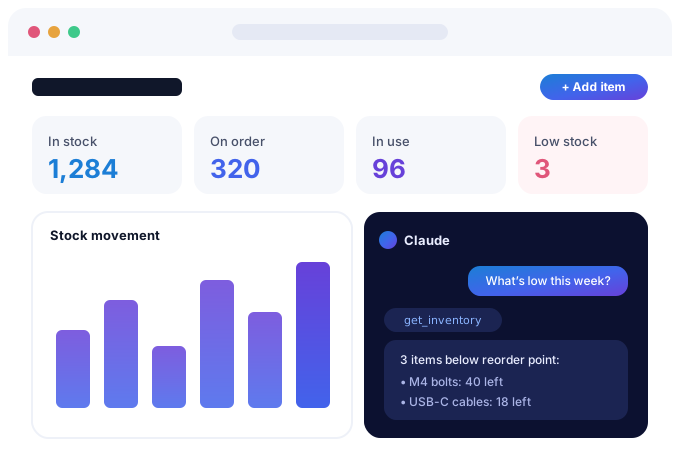
Simple Inventory Management ships with a built-in MCP (Model Context Protocol) server, the open standard AI assistants use to take real actions. AI reads your live stock and updates it on your say-so, scoped to the company you choose and secured with OAuth.
- M4 bolts: 40 left (reorder at 120)
- Blue enclosures: 12 left (reorder at 50)
- USB-C cables: 18 left (reorder at 75)
Secured with OAuth 2.1, PKCE and per-company access, so your data stays yours.
See Simple Inventory in action
A short walkthrough of the live app: inventory, day-to-day stock work, and AI.
Powerful features, zero complexity
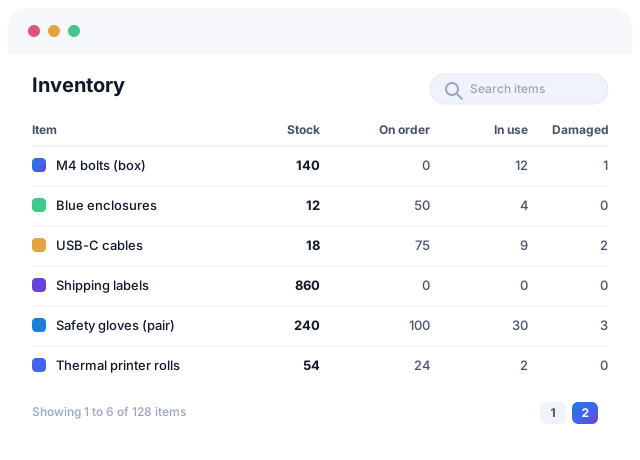
Inventory at a glance
Each company opens to an Overview of stock value, what needs attention, open orders and recent changes. The Inventory section shows Stock, Receiving, Sending and Damaged counts in one view, and search finds any item instantly so you always know exactly what you have.
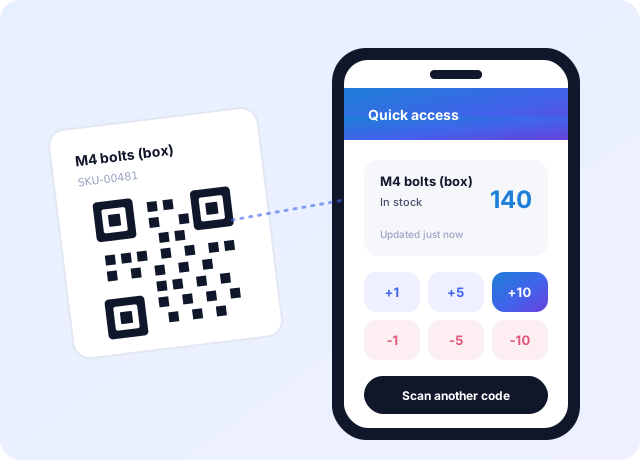
Manage stock from your phone
Every item gets a unique QR code. Scan it with your phone camera, or tap Scan in the app to read a QR label or barcode, and adjust counts on the warehouse floor with no downloads and no special hardware.
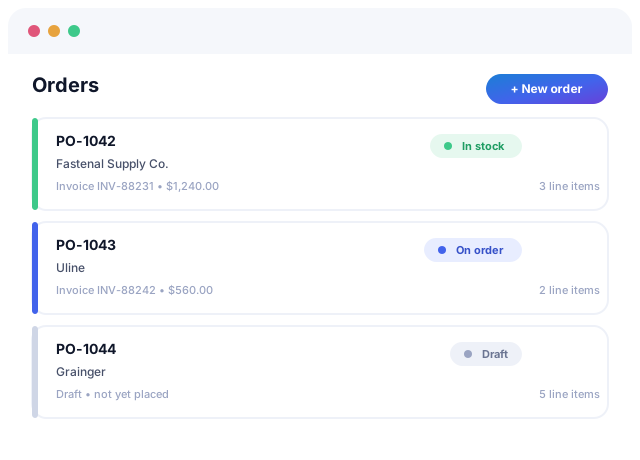
Integrated order management
Create a receiving order and its quantities show as Receiving; complete it and they move into Stock. Reorder suggestions draft one order per supplier, and you can track invoices, set item prices from the order, and never miss a shipment.
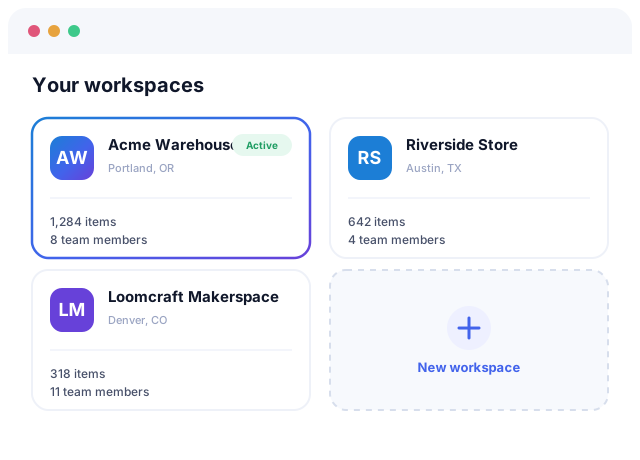
Multiple teams and locations
Organize inventory however your business works (by team, location or company) and give each one its own dedicated, secure workspace.
Quick adjustments
Tap -1 or +1 on any count, or use Adjust and Set exact for bigger changes, with a preview of the new total and an optional reason saved in the item’s history.
Low-stock alerts
Email your team or post to a Microsoft Teams channel the moment an item crosses its warning, critical or reorder level.
Track value & reorder
See the value of your stock, get reorder suggestions grouped by supplier, and jump to a reorder link in seconds.
Assemblies & builds
See how many products you can build from the parts in stock, then record a build to take the parts out of Stock in one step.
Reports & exports
Download stock value, low stock and change history as CSV or PDF, or import files for QuickBooks Online and Xero.
Full transaction history
Every change is logged so you can audit exactly what moved, when and by whom.
Stock that stays simple
Accurate counts, QR scans and AI when you want it. Everything else stays out of the way.
Frequently asked questions
How much does Simple Inventory Management cost?
It’s $35USD/month for unlimited inventory items, companies, snapshots and team members. For a limited time it’s free: sign up before the deadline shown on our pricing page and you’ll lock in a free lifetime membership.
What’s the best inventory management system for a small business?
The one your team will actually use. When you compare inventory systems for small business, look for fast setup, counting from a phone, low-stock alerts, and flat pricing that doesn’t grow with your headcount. Simple Inventory Management covers all of that for $35USD/month with unlimited items and team members, and you can try it free with no credit card.
Can I track inventory across multiple locations or companies?
Absolutely. Split inventory by team, location, warehouse or company and switch between them instantly.
Do I need to install an app to scan QR codes?
No. Each item has a unique QR code you can scan with your phone’s camera, with no app download required.
Can I connect AI assistants such as Claude, Grok, OpenAI, and Gemini to my inventory?
Yes. A built-in Model Context Protocol (MCP) server with secure OAuth login lets AI assistants such as Claude, Grok, OpenAI, Gemini, and other MCP clients read and update your stock in plain language.
Does it support SAML single sign-on (SSO)?
Yes. Verify your domain with a DNS record, connect any SAML identity provider (Okta, Microsoft Entra ID, Google Workspace and more), then require SSO and optionally auto-provision your team. See the single sign-on page.
Can I invite my team?
Yes, invite as many coworkers as you need to share the work of keeping inventory accurate.
Trusted to keep stock honest
We ditched three spreadsheets and a whiteboard. Now everyone scans a QR code and the counts just stay right.
Asking AI “what’s low this week?” and getting a real answer from our live stock still feels like magic.
Set up in an afternoon across two warehouses. The reconciliation snapshots alone paid for the year.
Start tracking smarter today
Normally $35USD/month, and free for a limited time. Join in under a minute, no credit card.
Get Started Now